Do QR Codes Expire? What Actually Makes One Stop Working
A QR code is just a printed pattern, and patterns don't expire. So why do so many stop working? Almost always because of a redirect you didn't know was there.
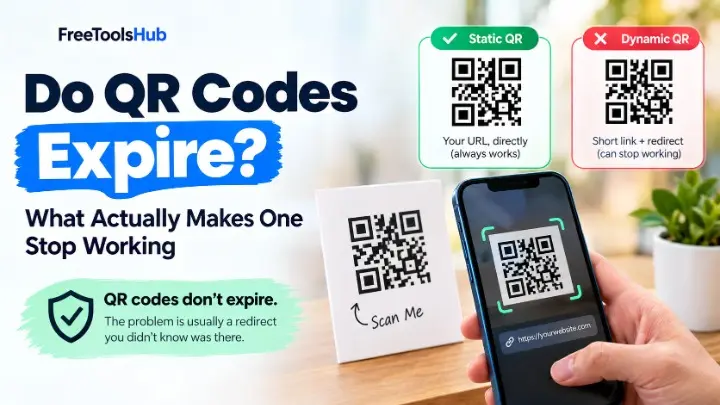
QR codes do not expire. The pattern is permanent and contains fixed data. What expires is the short link many generators hide inside it — a dynamic code pointing at their redirect service, which stops working if you stop paying or the company shuts down.
A QR code cannot expire. It is a printed pattern of black and white squares that encodes a fixed piece of data, and that data does not decay, phone home, or check a licence. A code printed on a leaflet in 2015 decodes to precisely the same text today as it did the day it was printed.
So when someone tells you their QR code stopped working, something else broke. Almost always, it is a redirect they did not know was in there.
Static versus dynamic: the distinction that actually matters
Every QR code is one of two kinds, and the difference decides whether it lasts forever or stops the day a subscription lapses.
| Static QR code | Dynamic QR code | |
|---|---|---|
| What it encodes | Your URL, directly | A short link on the generator's domain |
| Can the destination change? | No — fixed at creation | Yes, from their dashboard |
| Depends on a third party? | No | Yes, permanently |
| Stops working if you stop paying? | No | Yes |
| Stops working if the company folds? | No | Yes |
| Scan tracking | None built in | Usually included |
| Pattern complexity | Denser for long URLs | Always simple |
A static code is self-contained. The URL lives inside the pattern, your phone reads it, and nothing sits in between. There is no account, no server, and nothing to cancel.
A dynamic code encodes something like qr-svc.example/a8Kd2. Scanning it hits that company's server, which looks up where to send you and forwards you on. Useful — and it is also the business model. The redirect is the product they charge a monthly fee for.
The part that catches people out
You cannot convert a dynamic code to a static one after printing. The short link is baked into the pattern. If the redirect dies, every poster, business card and packaging run carrying that code dies with it.
How to check which kind you have, in about ten seconds
- Open your phone camera and point it at the code, but do not tap the notification yet.
- Read the URL in the preview banner.
- If it is your own domain, the code is static and permanent. If it is a short domain you do not recognise — especially one with the generator's brand in it — it is dynamic.
If you no longer have the original code, you can also paste the destination into a link preview tool to see where it ultimately resolves.
Why so many free generators produce dynamic codes
Because a static code is a one-off. You generate it, you leave, and there is no relationship to monetise. A dynamic code creates a dependency: the code only works while their server answers, which means a recurring reason to charge you.
That is a legitimate business, and dynamic codes genuinely solve a real problem. The failure is one of disclosure. Plenty of sites advertise a free QR generator, hand you a dynamic code, and only mention the trial window in the small print — by which point the code is on 5,000 printed flyers.
This is exactly why searches like permanent QR code generator exist. People have been burned once and now want to know the code will outlive the tool that made it.
Making a code that genuinely lasts
Three rules, in order of importance:
- Use a static code. Encode the destination directly. No redirect means nothing in the middle can fail.
- Point it at a URL you control. Your own domain, not a third-party short link. If you ever need to change where it goes, you can redirect it yourself — which gives you the flexibility of a dynamic code without renting it.
- Keep the destination stable. The commonest real-world break is a site redesign changing /menu to /our-menu. Set up a redirect when you restructure, or point codes at a URL you have decided will never move.
Our QR code generator produces static codes only. The URL you type is the URL encoded in the pattern — there is no redirect, no account, and no server of ours between the scan and the destination. It is generated in your browser at the highest error-correction level (H), so the code stays readable with roughly 30% of it damaged. If this site disappeared tomorrow, every code it has ever generated would keep working.
Print quality: the other reason codes fail
Once a code is genuinely static, the remaining failure mode is physical. QR codes carry error correction and tolerate a surprising amount of damage, but not unlimited amounts.
- Size. Roughly 2 × 2 cm minimum for a typical scan distance. Smaller codes need closer, steadier phones.
- Contrast. Dark pattern on a light background. Inverted or low-contrast codes fail on many scanners.
- Quiet zone. Leave clear margin around the code — about four modules' width. Crowding it with artwork is a common cause of failed scans.
- Shorter URLs scan better. Less data means a less dense pattern, which is more forgiving of poor light and cheap printing.
That last point is the one honest argument for a short link: density. If your URL is enormous, shortening it genuinely helps — but shorten it on a domain you own, so you are not handing the permanence of your print run to someone else.
The short version
QR codes do not expire. Dynamic ones stop working, static ones do not. Before you send anything to print, scan your own code and check the URL it shows — if you do not recognise the domain, you are renting that code, and the rent is due forever.
Frequently Asked Questions
Do QR codes expire?
No. A QR code is a printed pattern encoding fixed data, and that data never changes or decays. A code printed in 2015 scans exactly the same today. What can stop working is the destination it points to — most commonly a short link owned by the generator that created it.
Why did my QR code stop working then?
Almost certainly because it was a dynamic QR code. Instead of encoding your URL directly, it encodes a short link on the generator's domain, which redirects to your address. That gives them a subscription to charge for, and when the trial ends, the payment lapses, or the company disappears, the redirect dies and every printed code dies with it.
How do I tell if my QR code is static or dynamic?
Scan it and look at the URL your phone shows before opening it. If it is your own address, the code is static and permanent. If it is a short domain you do not recognise, it is dynamic and depends on that company staying alive and on your account staying active.
Can a static QR code ever break?
The code itself cannot, but what it points to can. If it encodes your own URL and you later change that page's address, the code leads nowhere. The fix is to keep the destination URL stable — point codes at a URL you control and can redirect yourself, rather than one that might be restructured later.
Is a dynamic QR code ever the right choice?
Yes, when you genuinely need to change the destination after printing, or you need scan analytics. A restaurant menu that changes weekly is a fair use. Just go in knowing you are renting the code: it works for exactly as long as you keep paying, and you cannot migrate it away afterwards.