

AksLingo: translate any word on the web — and actually remember it.
AksLingo is a free Chrome extension that translates any word or phrase you hover over or select on a web page, reads it aloud, and saves it to a personal flashcard deck reviewed with spaced repetition (SM-2). It works across 36 languages, adds full grammar tables for German, and needs no account — your deck stays in your browser.
- Price
- Free
- Languages
- 36
- Version
- 3.0.0
- Size
- 131 KiB
See AksLingo in action

What AksLingo does
Most translators give you an answer and forget it. AksLingo turns the words you look up into vocabulary you keep, without making you leave the page you are reading.
Hover or select to translate
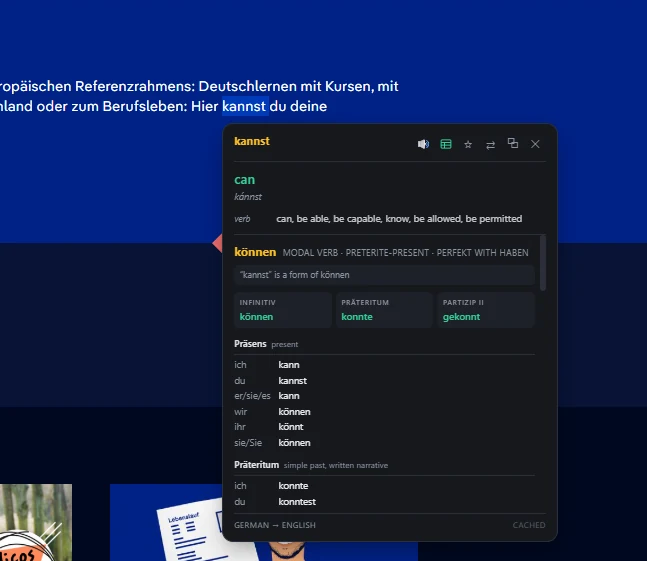
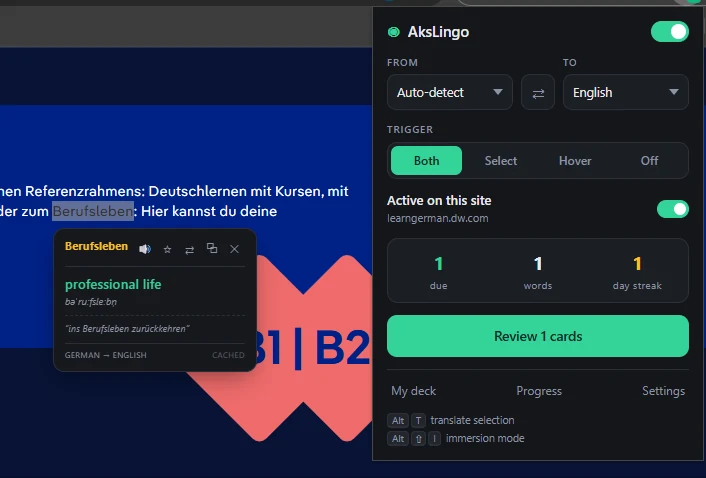
Point at a word or highlight a phrase to see its translation, part of speech, alternative meanings, example sentences, and romanization for non-Latin scripts. 36 languages in both directions, with auto-detection.
Hear the pronunciation
A speaker button reads the word in a voice matched to its language. Hold Shift for slower playback when a word is hard to catch.
Save words with context
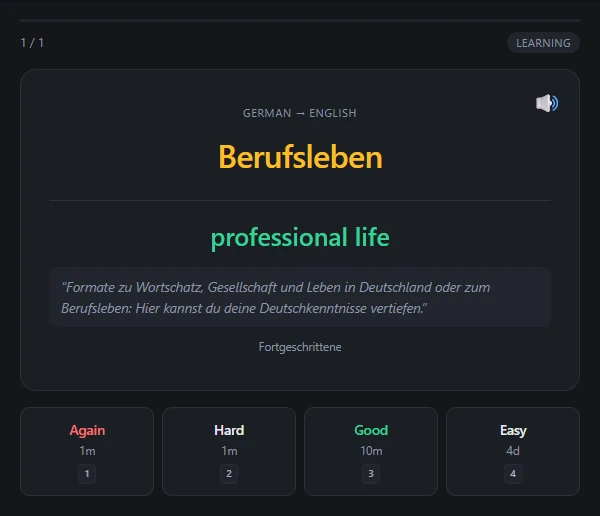
Press S to add a word to your personal deck. It keeps the original sentence and a link to the page, so you remember where you met it.
Spaced-repetition review
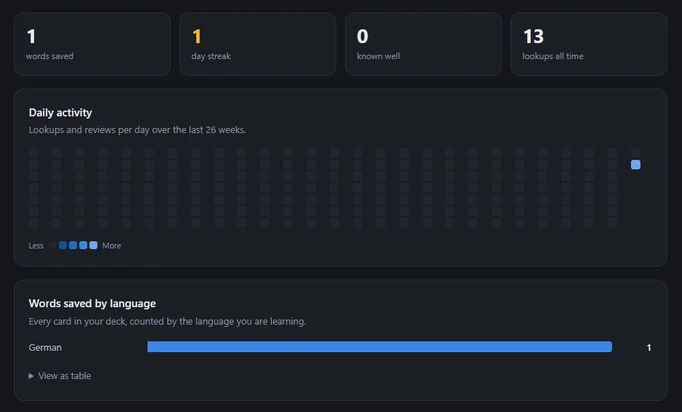
The toolbar badge shows how many cards are due. Reviews are scheduled with the SM-2 algorithm plus learning steps — the same family of scheduling used by Anki.
Immersion mode
Press Alt+Shift+I and a translation appears under every paragraph as you scroll, so you can read a foreign-language article side by side with your own language.
German grammar built in
Full verb conjugations with principal parts across Präsens, Präteritum, Perfekt, Plusquamperfekt, Futur I, Konjunktiv I/II and Imperativ, plus noun gender and cases and adjective comparatives.
How to use AksLingo
- Install AksLingo. Open AksLingo on the Chrome Web Store and click Add to Chrome. No account or sign-up is needed.
- Translate a word. On any web page, hover over a word or select a phrase to see its translation, meanings, examples and pronunciation.
- Save it to your deck. Press S in the tooltip to save the word together with the sentence and page it came from.
- Review due cards. When the toolbar badge shows cards are due, open the review, press Space to reveal each answer, and grade it with 1 to 4.
That loop — look up, save, review — is the whole method. Reading real websites gives you words that matter to you; spaced repetition brings each one back just before you would forget it.
Keyboard shortcuts
| Shortcut | What it does |
|---|---|
| Alt + T | Translate the current selection |
| Alt + Shift + I | Turn immersion mode on or off |
| Alt + Shift + O | Turn AksLingo on or off |
| S | Tooltip open: save the word to your deck |
| P | Tooltip open: play the pronunciation |
| G | Tooltip open: show German grammar tables |
| W | Tooltip open: flip the translation direction |
| C | Tooltip open: copy the word |
| Esc | Close the tooltip |
| Space, then 1 – 4 | During review: reveal the answer, then grade it |
AksLingo vs. a typical page translator
Page translators are great for understanding a page once. AksLingo is for learning the language on it.
| Feature | AksLingo | Typical page translator |
|---|---|---|
| Translate a single word on hover | Yes | Usually selection only |
| Translate the whole page | Paragraph by paragraph (immersion mode) | Yes |
| Pronunciation audio | Yes, language-matched voices | Sometimes |
| Save words to a personal deck | Yes, with sentence and source link | No |
| Spaced-repetition review | Yes (SM-2) | No |
| German conjugation and declension tables | Yes | No |
| Account required | No | Varies |
| Where your saved words live | Locally in your browser | — |
Built with German learners in mind
German is hard to look up word by word: a verb on the page might be ging, gegangen or ginge, and a dictionary only lists gehen. AksLingo shows the full picture right in the tooltip:
- Verbs: principal parts and conjugations in Präsens, Präteritum, Perfekt, Plusquamperfekt, Futur I, Konjunktiv I and II, Imperativ, and participles.
- Nouns: gender (der, die, das) and case forms.
- Adjectives: comparative and superlative forms.
Privacy
No accounts, no analytics, no tracking. Your saved words and review history are stored locally in your browser, not on a server. Text you choose to translate is sent to a translation service to be translated — free public services by default, or your own DeepL or Google Cloud account if you add an API key.
AksLingo at a glance
- Full name
- AksLingo — Immersive Translator & Vocabulary Trainer
- Type
- Chrome extension (Education)
- Price
- Free, no account required
- Languages
- 36, both directions, auto-detect
- Review algorithm
- SM-2 spaced repetition with learning steps
- Optional engines
- DeepL or Google Cloud Translation (your own API key)
- Works on
- Desktop Chrome — Windows, macOS, Linux, ChromeOS
- Version
- 3.0.0, updated September 25, 2026
- Support
- Report an issue on GitHub or email akslingo@gmail.com
Frequently asked questions
What is AksLingo?
AksLingo is a free Chrome extension for learning languages while you browse. You hover over or select any text on a web page to translate it, listen to it, and save it to a flashcard deck that you review with spaced repetition. It supports 36 languages.
Is AksLingo free?
Yes. AksLingo is free to install from the Chrome Web Store and does not require an account or subscription. If you want higher-quality machine translation, you can optionally add your own DeepL or Google Cloud Translation API key.
How is AksLingo different from Google Translate's extension?
A page translator converts text and forgets it. AksLingo is built for learning: it shows parts of speech, example sentences and pronunciation, lets you save a word with the sentence you found it in, and schedules reviews with the SM-2 spaced-repetition algorithm so the word stays in memory.
Does AksLingo collect my data or browsing history?
AksLingo has no accounts, no analytics and no tracking. Your saved cards, review statistics and settings are stored locally in your browser. Text you ask it to translate is sent to a translation service to be translated — free public services by default, or your own DeepL or Google Cloud account if you add an API key.
Which languages does AksLingo support?
AksLingo translates between 36 languages in both directions and detects the source language automatically. Words in non-Latin scripts are shown with romanization, and German gets extra grammar support: verb conjugations, noun gender and cases, and adjective comparatives.
Is AksLingo good for learning German?
Yes — German is where it goes deepest. Alongside translation it shows full verb conjugations with principal parts across every major tense and mood, the gender and case forms of nouns, and adjective comparatives, so you can read real German websites and look up grammar without switching tabs.
Does AksLingo work on mobile?
No. AksLingo is a desktop Chrome extension. Chrome on Android and iOS does not support extensions, so it runs on Chrome for Windows, macOS, Linux and ChromeOS.
How do I turn on immersion mode?
Press Alt+Shift+I on any page. AksLingo adds a translation beneath each paragraph as you scroll. Press the same shortcut again to turn it off, or Alt+Shift+O to switch the whole extension off.
Start learning from the pages you already read
Free on the Chrome Web Store. Installs in seconds, no sign-up.
Add to Chrome — it's freeFree Tools That Pair Well With AksLingo
Image to Text (OCR)
Extract text from any image
Word Counter
Count words, chars & reading time
Case Converter
Convert text case instantly